


AudiCable Audio Recorder
Download Adele Easy on Me Offline without Premium

By
Updated on: August 19, 2026
Category: Music Streaming Tips
Adele's Easy on Me became a global hit after its release on October 15, 2021, as the lead single from her album 30. Inspired by six years of personal change, the song broke streaming records on Spotify and Amazon Music, and reached No.1 in over 25 countries. But streaming doesn’t equal ownership. Even if you download the song in-app, it remains restricted and cannot be freely transferred or used.
If you want to keep Easy on Me permanently, converting it to a universal format is the key. This lets you play it offline on any device, burn it to a CD, or use it in your own videos without limits. In this guide, you’ll learn how to convert Easy on Me to MP3, AAC, FLAC, WAV, or AIFF without Premium, so you can truly own the song instead of just streaming it.

◉ How to Play Adele's Easy on Me Offline Without Any Streaming Subscription
Streaming services give you access, but not ownership. Every song you "download" inside Spotify, Apple Music, or Amazon Music is still tied to your subscription. Once you cancel, your downloads disappear. You also cannot transfer tracks, share them, or use them in your own projects.
The good news is that tools like AudiCable Audio Recorder make it possible to save songs locally. As a streaming music downloader, it supports most major platforms and lets you download Easy on Me in formats like MP3, FLAC, or AAC. It records at normal speed to reduce account risks and includes a mute mode, so you can download music quietly in the background while working.
The main features of AudiCable are listed below.
- 1. Download music from Spotify with a free or Premium account.
- 2. Download music from Spotify, Apple Music, Amazon Music, Tidal, Line Music, Deezer, YouTube Music, Pandora, etc.
- 3. Record and save Premium music to MP3, AAC, WAV, FLAC, AIFF, ALAC.
- 4. Download tracks with original audio quality and ID3 tags.
- 5. Play the downloaded songs on any device or PC with a common media player.
- 6. Not record sound from the background. Songs will be saved clean.
- 7. Can mute the recording sound and record in the background quietly.
- 8.Convert streaming music at up to 10X faster speed.
▶ Step 1: Select the Preferred Music Platform
Download and install AudiCable first. You can simply start this program on your computer. AudiCable's primary interface features a variety of music platforms, click Spotify App and go to the next step.

Note: To change the music platform's conversion mode, simply click the swapping icon in the upper right corner of the platform.
▶ Step 2: Select Output Parameters
Click Settings in the bottom left corner. You can choose an output format (MP3/AAC/WAV/FLAC/AIFF/ALAC), output quality, and a proper saving path.

▶ Step 3: Add Adele Easy On Me to AudiCable
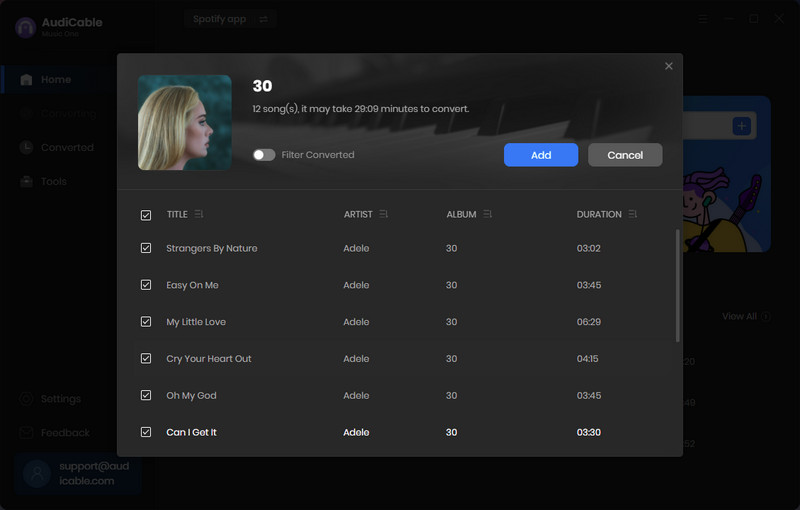
Now, enter adele on the Spotify App. In the search result, find Adele Easy On Me. Copy & paste the song or the album link to the URL parsing box of the AudiCable. Then tick the songs you want to convert in the queue, click "Add".
▶ Step 4: Start Converting Adele Album
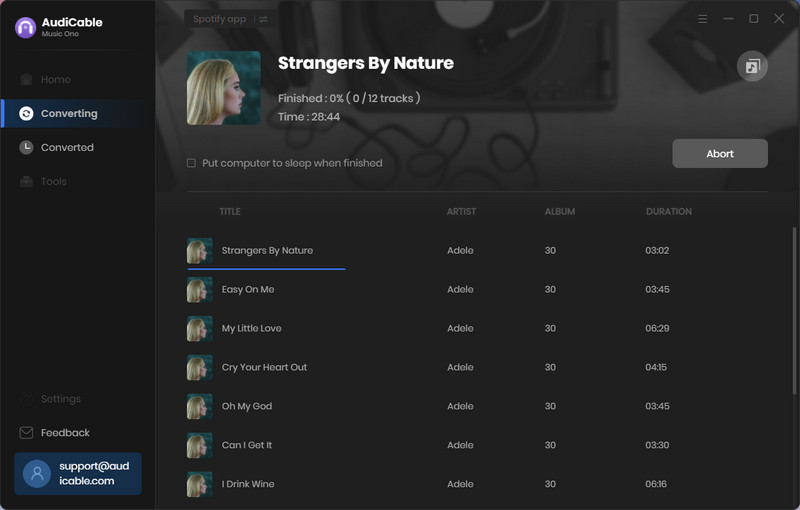
Click the "Convert" button, AudiCable will start converting the songs from Adele songs to the local folder. The download process will be finished soon.
▶ Step 5: Free Playback of Adele Album
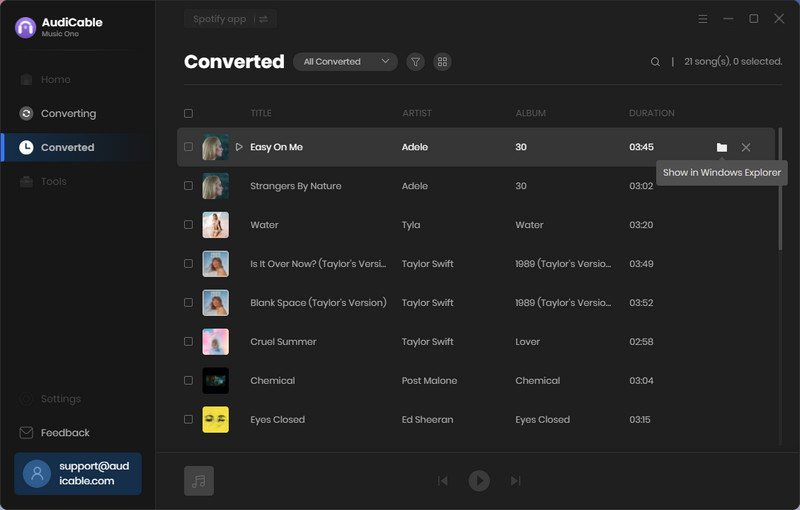
After it's finished, go to the left History column to see all of your downloaded music files. To locate the downloaded audio files, just click a "Folder" icon behind a song.
◉ Conclusion
Owning a song means having full control over how you use it. If you want to keep Easy on Me or any track from your playlist in a format that’s truly yours, AudiCable Audio Recorder offers a simple way to do it. It works with major streaming platforms and saves music as MP3, FLAC, and other common formats, so you can play your songs offline, transfer them freely, and keep them without relying on a subscription.

